I spend most of my time writing C code for STM32 microcontrollers. I have recently considered writing more code in C++, mainly for easier implementation of various design patterns and especially for using abstract classes for dependency injection when writing testable modules/classes.
However, when using STM32CubeMX to generate hardware initialization code, there is no option to use C++ instead of C. Mostly this is not a concern, since nearly all C code is also valid C++ code, so there is no problem including the generated C code in your C++ application code. However, CubeMX also generates a main.c file where all the hardware initialization functions are called. Since we might want to add some additional initialization code in C++, we would rather have a main.cpp file. You can try simply renaming the file, but the next time you make any changes in CubeMX and run the code generator, a new main.c file will be generated and main.cpp will remain untouched.
I have seen people suggest renaming main.cpp to main.c before generating code and then renaming it back to main.cpp afterwards, which doesn’t seem like a sustainable solution. Below I’ll present a simple workaround.
Create a C++ project or convert an existing C project in STM32CubeIDE
Create a new STM32 project by navigating to File > New > STM32 Project. Select your desired MCU or development board. When you get to the following screen, make sure to select C++ as the targeted language:

If you have an existing C project that you want to convert to C++, right click your project in the Project Explorer and select “Convert to C++”:

As far as I can tell, this simply adds the g++ compiler to your project toolchain.
After creating the project you will notice that a main.c file has been generated instead of main.cpp:
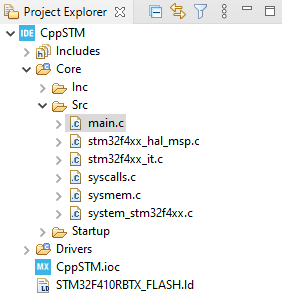
Instead of the silly renaming before and after running CubeMX, a simple workaround is to create an alternate main function in C++ but with C calling convention. Let’s name it alt_main(). We can then call this function from main.c inside a USER CODE BLOCK. This way CubeMX can still generate code in main.c, but you can use the alt_main() function as the entry point for your C++ application.
An alternate main() function
First we will create the header file for our alternate main function:
#ifndef ALT_MAIN_H_
#define ALT_MAIN_H_

#ifdef __cplusplus
extern "C"
{
#endif

int alt_main();

#ifdef __cplusplus
}
#endif

#endif
If we include the header from a C++ file, we see that the function declaration gets wrapped in an extern "C" block, ensuring that the function is called using C calling convention. If we include it from a C file, it just looks like a regular C function.
Next we will create the source file:
#include "alt_main.h"

int alt_main()
{
	/* Initialization */

	while (1)
	{
		/* Super loop */
	}
}
Notice that this is a .cpp file, so we can write all the C++ code we want in here.
Next, we will call alt_main() from within a USER CODE BLOCK in main() before the super loop:
int main(void)
{
  /* USER CODE BEGIN 1 */

  /* USER CODE END 1 */

  /* MCU Configuration--------------------------------------------------------*/

  /* Reset of all peripherals, Initializes the Flash interface and the Systick. */
  HAL_Init();

  /* USER CODE BEGIN Init */

  /* USER CODE END Init */

  /* Configure the system clock */
  SystemClock_Config();

  /* USER CODE BEGIN SysInit */

  /* USER CODE END SysInit */

  /* Initialize all configured peripherals */
  MX_GPIO_Init();
  MX_USART2_UART_Init();
  /* USER CODE BEGIN 2 */

  /* USER CODE END 2 */

  /* Infinite loop */
  /* USER CODE BEGIN WHILE */
  alt_main(); // Contains our super loop, so the while loop below will never be executed

  while (1)
  {
    /* USER CODE END WHILE */

    /* USER CODE BEGIN 3 */
  }
  /* USER CODE END 3 */
}
That’s it! Now you can just let CubeMX handle main.c and you can add your own code in alt_main.cpp.
Using the global peripheral handles
Lastly, if you are using the default CubeMX settings, all handles for the initialized peripherals will be defined globally in main.c. For example, if you initialize SPI1 in CubeMX, SPI_HandleTypeDef hspi1 will appear in the “Private variables” section in main.c. If you want to use this handle in alt_main.cpp, you’ll have to declare it extern in that file. This gets a bit messy if you have a lot of peripherals.
Instead, you can configure CubeMX to generate a separate header and source file for each type of peripheral. In CubeMX go to Project Manager > Code Generator and check the box “Generate peripheral initialization as a pair of ‘.c/.h’ files per peripheral“:

Now you can simply #include "spi.h" where all SPI handles are declared.
Thank you very much, it helped.
Especially the “Convert to C++” and the idea to run my alternate main().
I’m glad to hear you found it useful.
Hi! Every .cpp file is compiled using g++. There is a way to switch compiler to main.c file so it will be treated as .cpp file.
Right click on main.c -> Properties -> C/C++ Build -> Settings-> Command. Instead of gcc use g++
Check last comment https://shawnhymel.com/1941/how-to-use-c-with-stm32cubeide/